
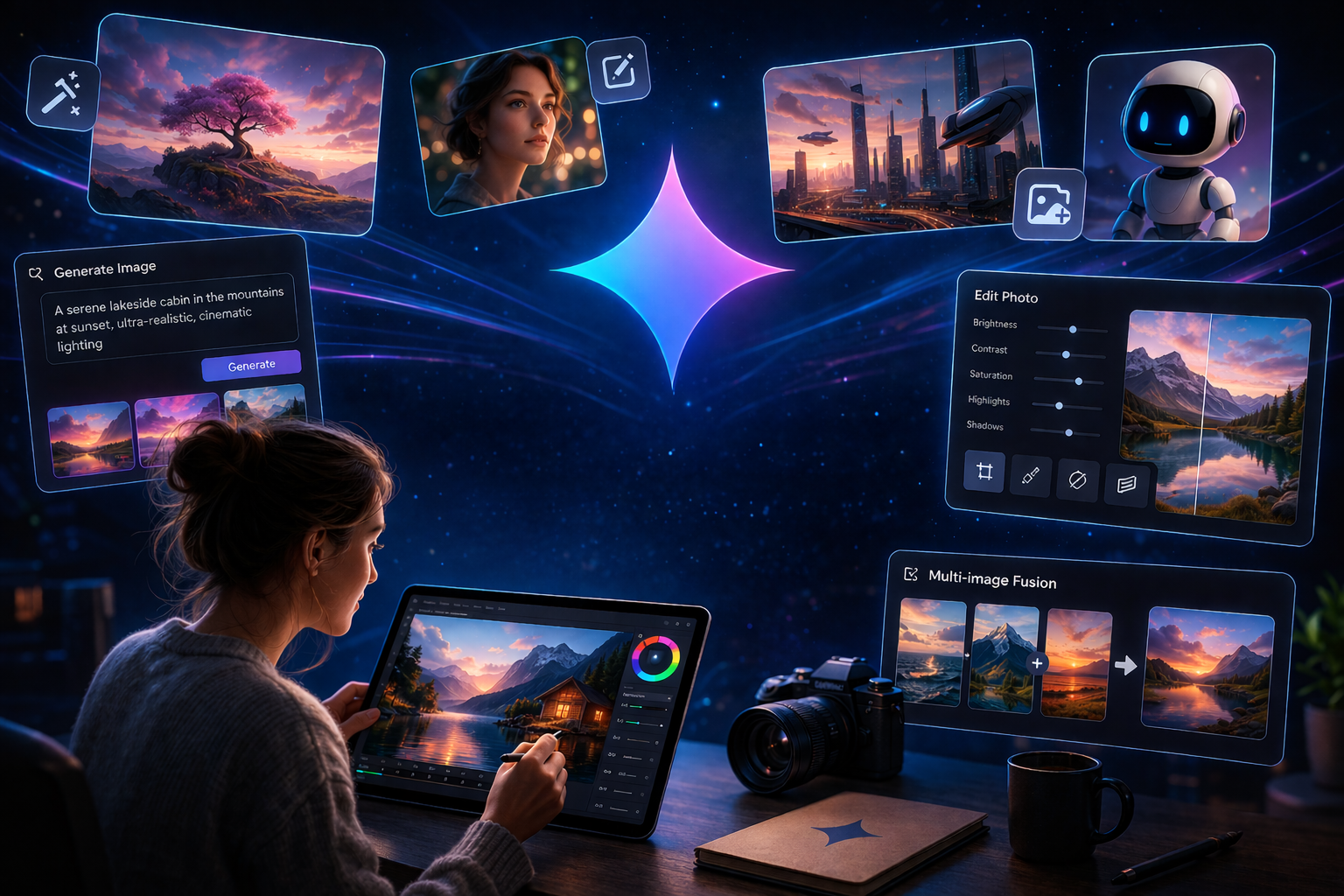
Gemini AI’s photo capabilities have transformed how creators, developers, and everyday users produce and edit visual content. Google’s Gemini AI platform, powered by its native image engine, Nano Banana, now offers one of the most versatile and accessible AI photo-generation and editing tools available today. From generating photorealistic images from text prompts to editing real photographs with plain language instructions, Gemini AI photo technology represents a significant leap forward in multimodal artificial intelligence. Whether you are a content creator, a developer building image-powered applications, or simply curious about what AI can do with a camera roll, this guide covers everything you need to know.
The rapid evolution of Gemini AI photo tools reflects a broader transformation in how artificial intelligence is reshaping creative industries from marketing and design to education and professional photography. As these tools become more capable and more accessible, understanding how to use them effectively is becoming an essential skill.
Core Features of Gemini AI Photo
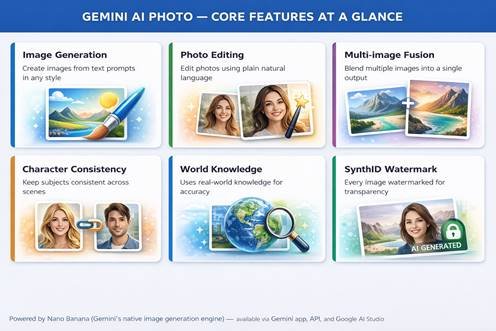
Fig. 1 — Six core capabilities of Gemini AI photo tools, powered by the Nano Banana engine
What Is Gemini AI Photo? Understanding Nano Banana
Gemini AI photo generation is built on a technology Google calls Nano Banana, the name for Gemini’s native image generation and editing capabilities. The engine is available in several model tiers: Nano Banana 2 (based on Gemini 3.1 Flash Image), which is optimized for speed and high-volume developer use, and Nano Banana Pro (based on Gemini 3 Pro Image), which prioritizes quality and handles the most complex generation tasks. Both models are available via the Gemini app, the Gemini API, Google AI Studio, and Vertex AI for enterprise users.
What distinguishes Gemini AI photo from many competing tools is its deep integration with the broader Gemini model’s world knowledge and multimodal understanding. Unlike image generators that are purely aesthetic, Gemini AI photo can leverage real-world knowledge to generate more accurate, contextually grounded images whether that means correctly depicting a specific architectural style, rendering an accurate diagram of a scientific concept, or producing a photorealistic scene that respects physical plausibility, including proper lighting, geometry, and object interactions.
Key Distinction: Gemini AI photo tools differ from Google’s older Imagen 3 model. Imagen 3 excels at pure photorealism and fine artistic styles (impressionism, anime, etc.), while Gemini’s Nano Banana models excel at contextual accuracy, conversational editing, and integration with real-world knowledge making each suited to different creative needs.
Key Features of Gemini AI Photo
Text-to-Image Generation
Gemini AI photo generation begins with a text prompt. Users can describe a scene, character, environment, or abstract concept, and the model produces a high-quality image in seconds. The engine supports a wide range of styles from photorealistic photography to oil painting, anime, isometric illustration, claymation, and more. Google recommends including specific details about the subject, setting, lighting, mood, color palette, composition, and aspect ratio. A prompt like “A young woman in a red dress running through a Paris park at golden hour, cinematic depth of field, 16:9” will consistently outperform a vague prompt. As of 2025, Gemini 2.5 Flash Image supports 10 different aspect ratios, enabling content creation for everything from social media posts to cinematic widescreen formats.
Natural Language Photo Editing
One of Gemini AI photo most remarkable capabilities is its natural language editing interface. Rather than using sliders, masks, or layer tools, users simply describe the change they want in plain language. Gemini can blur or replace backgrounds, remove objects or people from a scene, change the color or style of clothing, alter a subject’s pose, add color to a black-and-white photograph, apply cinematic film grain effects, or simulate motion blur, all from a single conversational instruction. The model preserves unchanged elements of the photo while making targeted, precise adjustments.
Multi-Image Fusion
Gemini AI photo can accept multiple input images and blend them into a single coherent output. Users can place an object from one image into a scene from another, restyle a room using a color scheme or texture taken from a reference photo, or fuse two visual concepts into a single composition. This capability is particularly useful for e-commerce product photography, interior design visualization, and creative concept art.
Character Consistency
A longstanding challenge in AI image generation has been maintaining consistent character appearance across multiple images, critical for storytelling, game development, and brand asset creation. Gemini AI photo addresses this directly, allowing users to place the same character in different environments, showcase a product from multiple angles in new settings, or create an entire series of on-brand visual assets that look like they came from the same creative vision. Developers working with AI tools for digital transformation have been among the earliest adopters of this feature.
SynthID Watermarking
Every image generated by Gemini AI photo is embedded with SynthID, Google DeepMind’s digital watermarking technology. SynthID embeds an invisible watermark directly into the pixel data of each generated image, allowing it to be identified as AI-generated even after cropping, filtering, or resizing. A visible watermark is also applied by default. Users can also upload any image to the Gemini app to check whether it was generated by Google AI. This approach to transparency reflects responsible AI development principles that are becoming increasingly important across the industry.
Gemini Image Models Compared
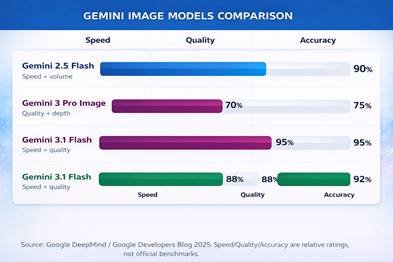
Fig. 2 — Relative speed, quality, and accuracy ratings across Gemini’s three image models
Gemini Image Models: Which One Should You Use?
Google offers three distinct Gemini image models, each optimized for different use cases. Understanding the differences helps users and developers choose the right tool for their specific creative or technical requirements.
| Model | Best For | Speed | Quality | Access |
| Gemini 2.5 Flash Image | High-volume API, developers | Fastest | High | API / AI Studio |
| Gemini 3 Pro Image | Complex, multi-turn generation | Slower | Highest | API / Vertex AI |
| Gemini 3.1 Flash Image | Speed + quality balance | Very Fast | Very High | API / AI Studio |
For everyday users accessing Gemini through the app, the model selection is streamlined into Fast, Thinking, and Pro options under the Create Images tool. For developers building applications, the Gemini API provides direct access to all three model variants with full control over parameters. Enterprise users can access the models through Google Cloud Vertex AI, which adds additional compliance, security, and scalability features.
How to Use Gemini AI Photo — 5 Steps
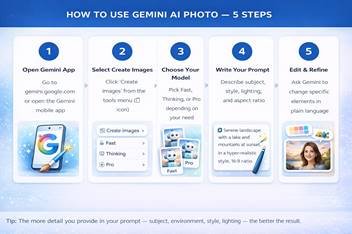
Fig. 3 — Step-by-step guide to generating and editing images with Gemini AI photo tools
How to Use Gemini AI Photo: Step-by-Step Guide
Step 1 — Access the Gemini App or API
Gemini AI photo tools are accessible in multiple ways. For personal use, visit gemini.google.com or download the Gemini app on iOS or Android. For developers, the Gemini API is available through Google AI Studio, which offers a free tier for testing. Enterprise applications are served through Vertex AI on Google Cloud.
Step 2 — Select Create Images
Within the Gemini app, click the tools menu and select the Create Images option, identified by the banana emoji icon. This launches the Nano Banana interface where you can enter text prompts, upload images for editing, or combine both in a single instruction.
Step 3 — Choose Your Model
Select Fast for quick results and high-volume tasks, Thinking for more complex generation with deeper reasoning, or Pro for the highest quality output when working on demanding creative projects. Google AI Pro, Plus, and Ultra subscribers have access to the Pro model, while the Fast model is available to all users.
Step 4 — Write an Effective Prompt
The quality of your prompt directly determines the quality of your Gemini AI photo output. Google recommends using this formula: “Create an image of [subject] [action/state] [scene/environment] in the style of [artistic style] with [aspect ratio].” Include specifics about lighting (golden hour, studio lighting, overcast), mood (melancholic, vibrant, tense), camera style (wide-angle, macro, aerial), and color palette. The more precisely you communicate your vision, the more accurately the model will execute it. For editing existing photos, upload the image and describe exactly what you want changed and what you want preserved. This connects directly to how AI tools are transforming content creation workflows across industries.
Step 5 — Iterate and Refine
Gemini AI photo supports conversational refinement, you can ask the model to adjust specific elements of a generated image without regenerating the entire composition. Ask it to change the background color, adjust the lighting temperature, remove a specific object, or apply a different artistic filter. Each iteration builds on the previous output, allowing you to progressively refine an image toward your exact vision.
Best Use Cases for Gemini AI Photo
Gemini AI photo tools have found applications across a remarkably wide range of industries and creative disciplines. The integration of AI in education has been particularly notable, as educators are using Gemini to generate custom diagrams, illustrated explanations, and visual learning aids from simple text descriptions. Similarly, AI in healthcare teams is exploring how accurate medical illustration from descriptive prompts could support training, patient communication, and research documentation.
- E-commerce: Generate consistent product photography from multiple angles across different settings without photoshoots.
- Content creation: Produce custom illustrations, social media graphics, and blog images on demand.
- Game and app development: Create character art, scene backgrounds, and UI assets with character consistency maintained across outputs.
- Marketing and advertising: Build branded visual assets using templates and consistent brand colors and styles.
- Education: Generate diagrams, illustrated explainers, and visual learning aids from text descriptions.
- Personal creativity: Transform photos into art styles, create custom portraits, or visualize creative concepts.
Pricing and Key Stats
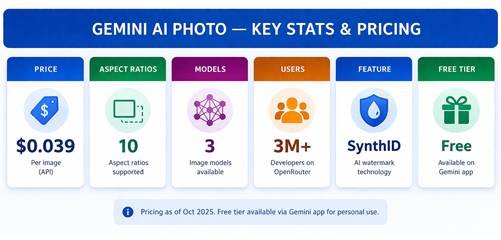
Fig. 4 — Key statistics and pricing for Gemini AI photo generation via the API (October 2025)
Pricing and Availability
Gemini AI photo tools are available at multiple price points to suit different user types. For personal users, the free tier of the Gemini app includes access to the Fast image generation model with daily usage limits. Google AI Pro, Plus, and Ultra subscription plans unlock the Pro model (Nano Banana Pro) with higher quality output and greater usage allowances.
For developers and enterprises using the Gemini API, image generation via Gemini 2.5 Flash Image is priced at $0.039 per image, or $30.00 per one million output tokens (each image equates to approximately 1,290 output tokens). Pricing for other input and output modalities aligns with the standard Gemini 2.5 Flash model pricing. The model became generally available for production use in October 2025, following its initial preview launch in August 2025.
Available on OpenRouter: Google has partnered with OpenRouter.ai, providing access to Gemini 2.5 Flash Image for their 3M+ developer community and fal.ai, a leading generative media developer platform. This makes Gemini AI photo capabilities accessible to a much broader developer ecosystem beyond Google’s own tooling.
Limitations and Responsible Use
Despite its impressive capabilities, Gemini AI photo is not without limitations. The model can still struggle with small faces, accurate spelling embedded in images, and fine details in complex compositions. When generating infographics, annotated diagrams, or data-heavy visuals, it may occasionally misinterpret information or produce factually incorrect results. Users should always verify data-driven AI image outputs. The model’s natural language processing capabilities are multilingual, but may struggle with grammar, cultural nuances, or idiomatic phrases in less common languages.
On the responsible use side, Google has designed Gemini AI photo in accordance with its AI Principles. The SynthID watermarking system ensures every generated image can be identified as AI-created, addressing concerns about synthetic media being mistaken for authentic photographs. Content filters are built into the system to prevent the generation of harmful, deceptive, or misleading imagery.
Conclusion
Gemini AI photo technology has arrived at an impressive level of maturity. From text-to-image generation and natural language photo editing to multi-image fusion and consistent character creation across scenes, the capabilities on offer through Nano Banana represent some of the most practically useful generative AI tools available in 2025. Whether accessed through the free Gemini app, the developer API, or Google Cloud’s enterprise Vertex AI platform, these tools are now within reach of virtually anyone with a creative vision and a well-crafted prompt. As AI tools continue to reshape creative and professional workflows, mastering Gemini AI photo capabilities is quickly becoming a valuable skill not just for designers and developers, but for anyone who communicates visually. The best results, as always, come from combining the model’s remarkable technical capabilities with clear, detailed, imaginatively considered prompts.