
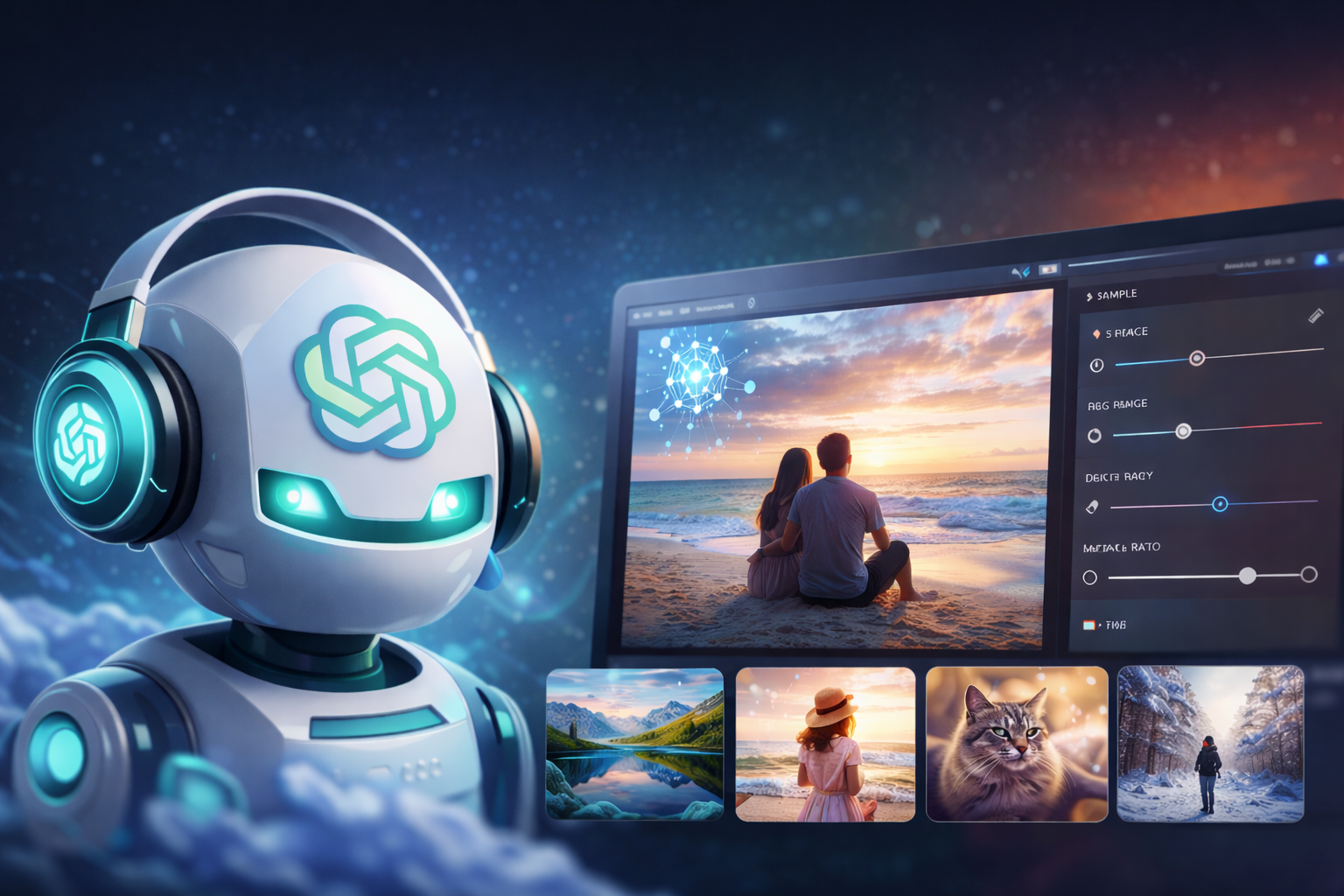
ChatGPT AI foto capabilities have undergone a remarkable transformation, making OpenAI’s flagship chatbot one of the most powerful and accessible image creation tools available today. The term ChatGPT AI foto, widely used across Europe and Latin America to describe ChatGPT’s photo and image generation features, refers to the platform’s ability to generate photorealistic images, edit existing photographs, and create any kind of visual content from plain text descriptions. Powered by GPT-4o and the latest GPT Image 1.5 model, ChatGPT Foto AI is now available to all users, free and paid, making professional-grade image creation more democratic than ever before.
Whether you are searching for ChatGPT foto ai, gpt ai foto, or simply trying to understand what ChatGPT can do with images, this guide covers everything from core features and model history to step-by-step instructions, pricing, expert prompt tips, and how ChatGPT compares to competing AI photo tools. For a broader context on how AI tools are transforming creative workflows, ChatGPT’s image capabilities represent one of the most significant developments of the past year.
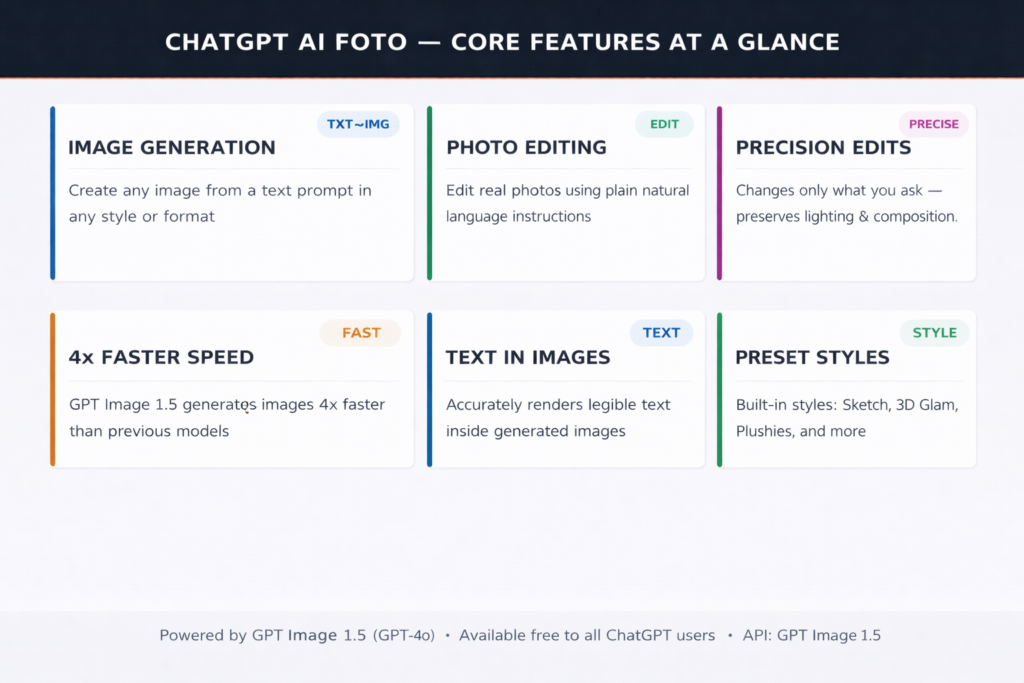
ChatGPT AI Foto — Core Features at a Glance
What Is ChatGPT AI Foto?
ChatGPT AI foto refers to the suite of image generation and photo editing features built natively into ChatGPT. Unlike earlier tools such as DALL·E, which required a separate interface, ChatGPT’s image capabilities are now fully integrated into the main chat experience and a dedicated Images sidebar. Users can generate entirely new images from text prompts, upload existing photos for AI-powered editing, apply preset artistic styles, or combine text and image instructions in a single conversational session.
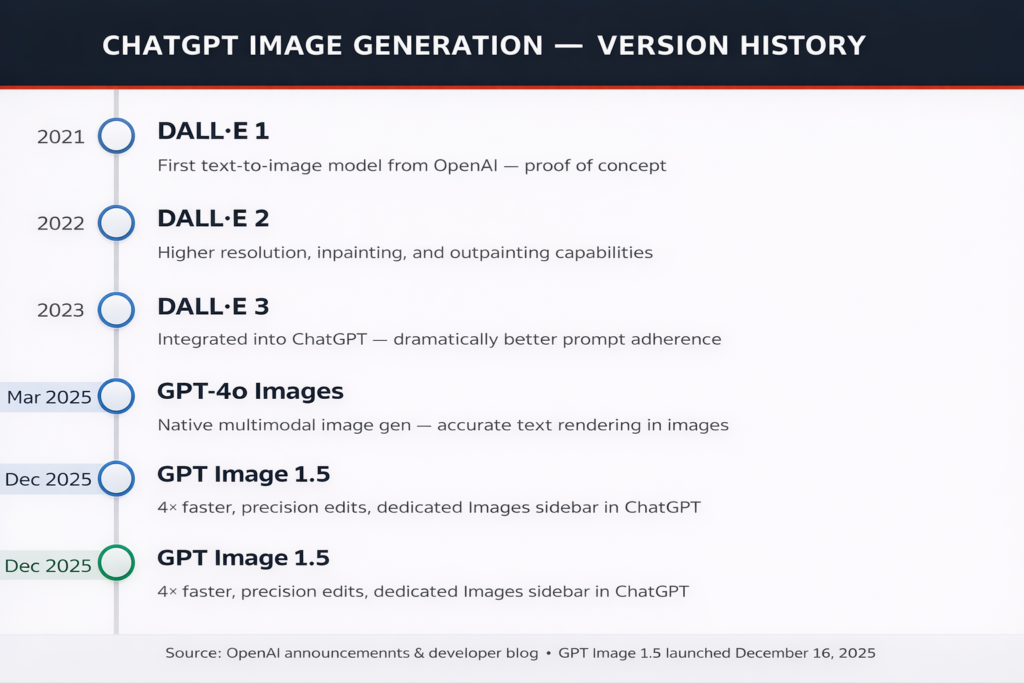
The technology behind ChatGPT AI foto has evolved rapidly. The current flagship model is GPT Image 1.5, released in December 2025, which delivers images four times faster than its predecessor, makes precise targeted edits while preserving unchanged elements, and renders legible text accurately inside generated images, a longstanding weakness of earlier AI image tools. The model is natively multimodal, meaning it can link knowledge between text and images to produce contextually grounded, semantically accurate visual outputs.
Key Fact: GPT Image 1.5 launched on December 16, 2025, as a direct competitive response to Google’s Nano Banana Pro, which had been topping industry benchmarks. OpenAI CEO Sam Altman reportedly issued a ‘code red’ memo accelerating the model’s release after Google’s image tools gained significant market share.
Core Features of ChatGPT Foto AI
Text-to-Image Generation
The foundational feature of ChatGPT AI foto is text-to-image generation. Users describe what they want to see in plain language and GPT-4o produces a matching image within seconds. The model supports an enormous range of visual styles, including photorealistic photography, oil painting, watercolor, anime, pencil sketch, 3D render, claymation, vintage photography, and more. Unlike many competing tools, ChatGPT foto AI does not require specialized prompt syntax; it interprets natural language descriptions much as a human artist would, reading intent, context, and nuance rather than relying on keyword lists. As AI in education experts have noted, this accessibility is transforming how students and teachers create visual learning materials.
Natural Language Photo Editing
Perhaps the most practically transformative feature of ChatGPT AI foto is its natural language editing interface. Users can upload any photograph and describe the changes they want in plain language, and the model applies precisely those changes while preserving everything else. Ask it to swap a shirt color, remove an object from the background, add a person to a scene, change the time of day, apply a film-grain filter, or simulate a specific camera lens, and the model will execute the instruction while keeping lighting, composition, facial features, and atmosphere intact. This closes the gap between casual AI experimentation and professional creative work.
Precision Editing With Element Preservation
A major improvement in GPT Image 1.5 over earlier ChatGPT foto AI models is its precision editing capability. Previous models would often re-render the entire image when asked for a small change, resulting in inconsistent results. GPT Image 1.5 makes targeted, localized edits — changing only the specific element the user requests while preserving all other details exactly as they were. This makes the tool suitable for professional workflows such as product photography enhancement, marketing asset creation, and portrait retouching.
Preset Styles and the Images Sidebar
Alongside the conversational image interface, ChatGPT has introduced a dedicated Images section in the sidebar accessible via chatgpt.com/images. This space includes a library of preset visual styles, including Sketch, Plushies, 3D Glam Doll, Retro Mall Studio, and more, as well as trending prompt suggestions that make it easy to get started without writing a custom prompt. Users can also upload a one-time likeness image, allowing their appearance to be reused consistently across future generations without searching through their camera roll each time.
Accurate Text Rendering
One of the most frustrating limitations of earlier AI image generation tools was their inability to accurately render text inside images. Signs, labels, posters, and infographics with clearly readable text were nearly impossible to achieve. GPT Image 1.5 has substantially addressed this limitation, producing denser, smaller, and more accurate characters in generated images, making the tool genuinely viable for creating marketing materials, educational infographics, and signage mockups that actually require legible text.
ChatGPT Image Generation Version History
ChatGPT Foto AI vs. Competitors: How Does It Compare?
The AI photo generation landscape is increasingly competitive, with Google’s Gemini (Nano Banana Pro), Midjourney, Adobe Firefly, and Stable Diffusion all vying for creative users. Understanding where ChatGPT AI foto stands within this landscape helps users choose the right tool for their specific needs.
| Feature | ChatGPT AI Foto | Gemini Nano Banana | Midjourney |
| Free tier available | Free | Free | Paid only |
| Conversational editing | Yes | Yes | No |
| Precise targeted edits | Yes | Yes | No |
| Accurate text in images | Yes | Partial | No |
| Preset styles library | Yes | No | Yes |
| Integrated chatbot context | Yes | Yes | No |
| API access | Yes | Yes | No |
| 4K / HD quality | Yes | Yes | Yes |
ChatGPT AI foto’s clearest competitive advantage is the seamless integration of image generation within a conversational AI context. Because ChatGPT’s broader AI capabilities include access to the model’s extensive world knowledge, cultural references, historical context, and reasoning ability, image prompts can be more nuanced and contextually rich than with standalone image tools. A user can ask ChatGPT to ‘generate an image in the style of Vermeer but set in modern-day Tokyo’ and the model understands both the artistic reference and the geographic context without needing to explain either.
How to Use ChatGPT AI Foto: Step by Step
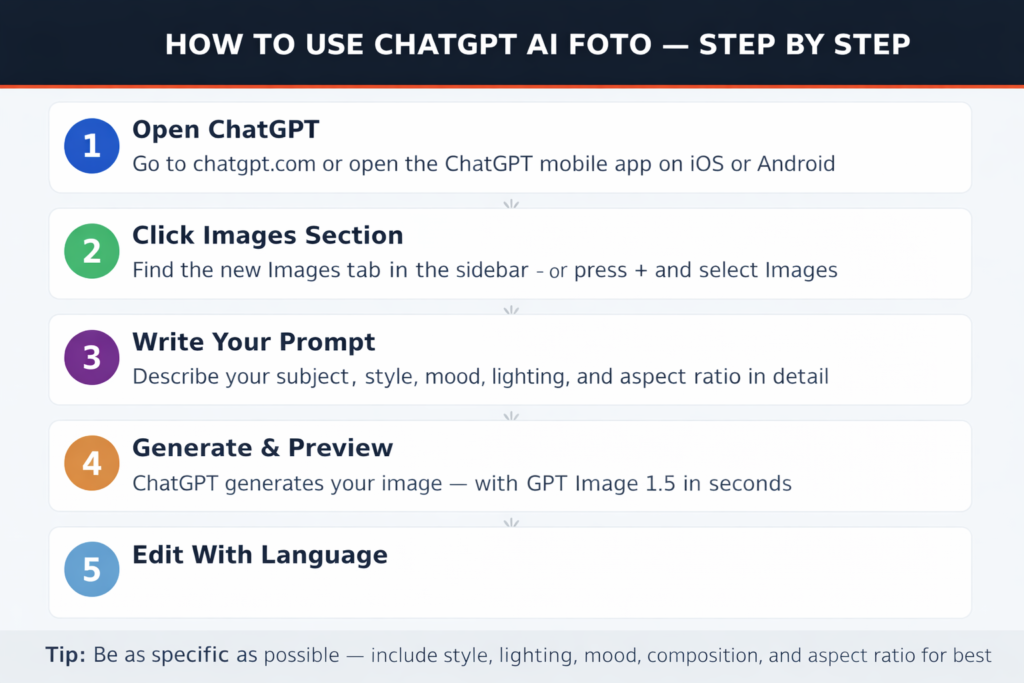
How to Use ChatGPT AI Foto: Complete Step-by-Step Guide
Step 1 — Access ChatGPT
ChatGPT AI foto is accessible via chatgpt.com on desktop or through the ChatGPT mobile app on iOS and Android. No additional subscription is required to access basic image generation. The free tier includes a daily allocation of image generations using the fast model. ChatGPT Plus subscribers ($20/month) receive unlimited image generation access with the Pro model.
Step 2 — Open the Images Section
For a dedicated image creation experience, navigate to chatgpt.com/images or click the new Images tab in the ChatGPT sidebar. This interface displays preset style options, trending prompts, and your image history. Alternatively, you can generate images directly in any standard chat session by describing what you want. ChatGPT will recognize the request and produce an image without requiring you to switch interfaces.
Step 3 — Write Your Prompt
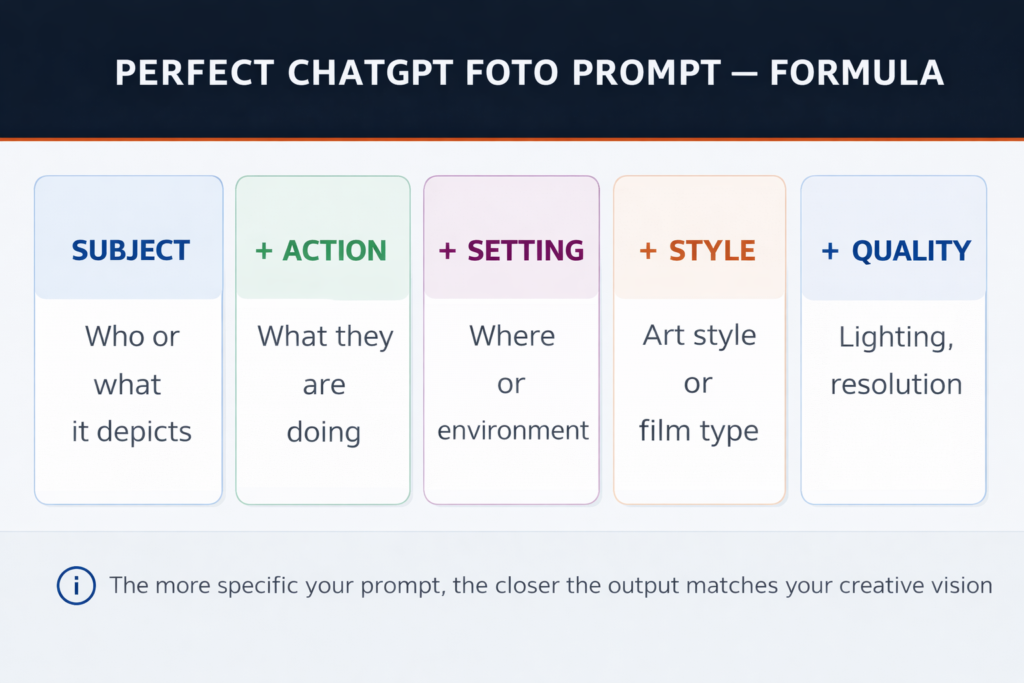
The quality of your ChatGPT AI foto output depends heavily on the quality of your prompt. A strong prompt includes: the subject (who or what appears in the image), the action or state (what they are doing), the setting (environment or location), the visual style (photorealistic, oil painting, anime, etc.), the lighting (golden hour, studio, overcast), and the aspect ratio (16:9 for widescreen, 1:1 for social media, 9:16 for mobile). Example: “A young chef plating food in a Michelin-star kitchen, cinematic lighting, shallow depth of field, 16:9, photorealistic.”
Step 4 — Generate and Review
ChatGPT will generate your image within seconds. GPT Image 1.5 can produce images up to four times faster than earlier models, and multiple generations can run in parallel. You can submit a new prompt while a previous image is still rendering. Review the output and use follow-up conversational instructions to refine any elements that do not match your vision.
Step 5 — Edit Your Photo With Natural Language
To edit an existing photo, click the attachment icon in the chat input, upload your image, and type your editing instructions. ChatGPT foto AI will analyze the image and apply precisely the changes you describe while preserving all other elements. You can iterate as many times as needed; each instruction builds on the previous state of the image, allowing progressive, controlled refinement toward your final result.
Pricing and Key Statistics
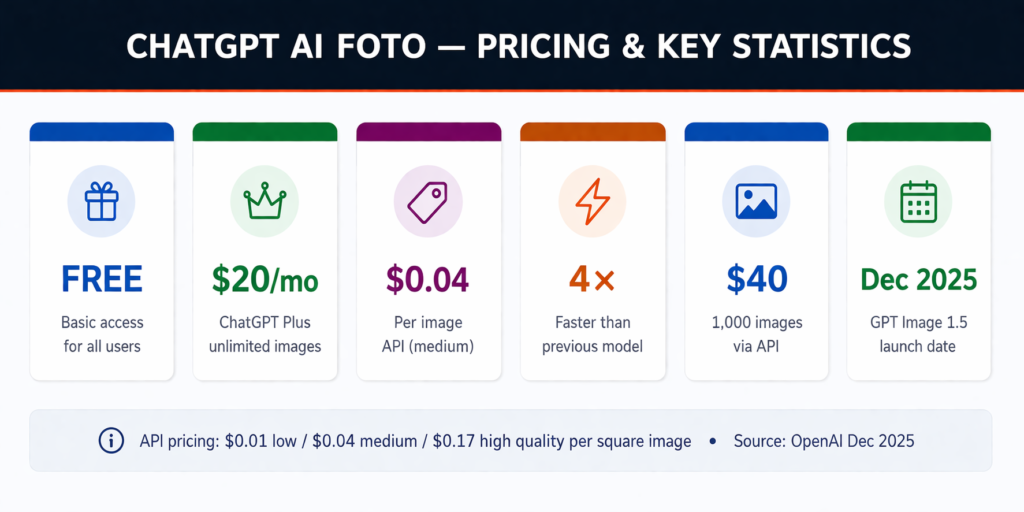
ChatGPT AI Foto Pricing
ChatGPT AI foto operates on a tiered pricing model designed to serve both casual users and enterprise-scale developers. The free tier provides a daily allowance of image generations for all registered users, enough for casual personal use but limited for professional workflows. ChatGPT Plus at $20 per month unlocks unlimited image generation with the Pro model and access to all preset styles and the one-time likeness feature.
For developers and businesses using the API, GPT Image 1.5 is priced at three quality tiers: $0.01 per image at low quality, $0.04 per image at medium quality, and $0.17 per image at high quality (all prices for square images). This means 1,000 medium-quality social media images cost approximately $40, competitive with other commercial AI image generation APIs. Token-based pricing is also available at $5 per one million input tokens and $40 per one million image output tokens.
API Cost Example: Generating 500 product images at medium quality for an e-commerce catalog costs approximately $20 via the ChatGPT foto AI API, a fraction of traditional photography costs for equivalent output volume.
The Perfect ChatGPT Foto Prompt Formula
Expert Tips for Better ChatGPT AI Foto Results
- Be specific about lighting ‘golden hour’, ‘overcast diffuse light’, ‘dramatic studio lighting with one key light’, all produce dramatically different results than ‘good lighting’.
- Specify the camera or lens style, ‘shot on a 35mm film camera’, ‘macro lens’, ‘wide angle aerial view’, or ‘telephoto compression’, which helps the model understand perspective and depth.
- Name your artistic references, ‘in the style of a Dutch Golden Age oil painting’, ‘Wes Anderson color palette’, or ‘Bauhaus poster aesthetic’, gives the model a rich visual library to draw from.
- Use negative instructions when needed, tell ChatGPT what you do NOT want in the image (e.g., ‘no watermarks’, ‘no text’, ‘no people in background’).
- Iterate conversationally instead of writing a perfect prompt from scratch, start simple and refine with follow-up instructions like ‘make it more dramatic’, ‘change the color of the jacket to navy blue’, or ‘remove the background and replace it with a forest’.
For photo edits, describe what to preserve: ‘keep the lighting and composition the same, only change X’ helps the model understand what should not change
Use Cases for ChatGPT Gpt AI Foto
ChatGPT AI foto tools have found application across a wide range of professional and personal contexts. In AI and marketing, teams are using gpt ai foto to generate social media visuals, product mockups, advertising creatives, and branded templates at a fraction of the cost and time of traditional design workflows. AI in healthcare teams is generating patient-friendly educational diagrams, illustrated guides, and training materials. E-commerce businesses are producing consistent product photography from multiple angles, against different backgrounds, without photoshoots.
- Content creators: Generate custom illustrations, thumbnails, and social media images on demand.
- E-commerce: Product photography from multiple angles and in multiple settings without a studio.
- Marketing teams: Rapid creative ideation, campaign visuals, and branded content.
- Educators: Custom learning visuals, diagrams, and illustrated explanations.
- Game and app developers: Character art, scene backgrounds, UI mockups, and concept art.
- Personal creativity: Photo transformations, portrait art, travel memory reimagining, and creative experimentation.
Limitations of ChatGPT AI Foto
Despite impressive advances, ChatGPT AI foto is not without limitations. The model can still struggle with complex scenes involving multiple interacting people, highly precise spatial relationships, and intricate fine details in very small elements. While text rendering has improved substantially in GPT Image 1.5, long passages of text or unusual typefaces can still produce errors. For maximum photorealism in highly specific artistic styles, dedicated tools like Midjourney may still produce superior results for certain use cases. Commercial use of AI-generated images requires users to review OpenAI’s terms of service, particularly regarding the use of likeness features and content involving real people.
Environmental considerations are also relevant high-quality AI image generation relies on powerful GPU infrastructure that consumes significant energy and water. Users who need to produce images at scale should factor this into their sustainability considerations.
Conclusion
ChatGPT AI foto has arrived at a genuinely impressive level of capability. The combination of GPT Image 1.5’s speed, precision editing, accurate text rendering, and seamless integration with ChatGPT’s conversational intelligence makes it one of the most versatile and accessible AI photo generation tools available in 2025. Whether you are searching for chatgpt ai foto, chatgpt foto ai, or gpt ai foto, the answer is the same: a powerful, free-to-start creative tool that anyone can use. From generating a quick social media image to building a sophisticated product photography pipeline via the API, ChatGPT foto AI scales to meet users wherever they are. As AI continues to reshape how we create and communicate visually, mastering these tools is becoming an increasingly valuable skill, and the barrier to entry has never been lower.
Frequently Asked Questions (FAQs)
1. What is ChatGPT AI foto?
ChatGPT AI foto refers to the built-in image generation and photo editing features inside ChatGPT that allow users to create, modify, and enhance images using simple text prompts. It is powered by GPT-4o and the latest GPT Image 1.5 model.
2. Is ChatGPT AI foto free to use?
Yes, ChatGPT AI foto is available on the free plan with a limited number of daily image generations. For unlimited access and advanced features, users can subscribe to ChatGPT Plus.
3. What is GPT Image 1.5?
GPT Image 1.5 is the latest image generation model released in December 2025. It offers faster image creation, precise editing, improved text rendering, and better overall image quality compared to previous versions.
4. How does ChatGPT generate images from text?
ChatGPT uses advanced AI models to interpret natural language prompts and convert them into visual outputs. It understands context, style, lighting, and composition to generate highly realistic or artistic images.
5. Can ChatGPT edit existing photos?
Yes, users can upload an image and give instructions in plain language (e.g., change background, remove objects, adjust colors). ChatGPT will apply targeted edits while preserving the rest of the image.
6. How accurate is text inside AI-generated images?
With GPT Image 1.5, text rendering has improved significantly. The model can now create clearer and more readable text in images, although very long or complex text may still have minor errors.
7. Can ChatGPT AI foto be used for commercial purposes?
Yes, it can be used for business purposes like marketing and e-commerce. However, users should review OpenAI’s usage policies, especially when dealing with real people or branded content.
8. Can I use ChatGPT AI foto on mobile devices?
Yes, ChatGPT AI foto is available on both desktop and mobile apps (iOS and Android), allowing users to generate and edit images on the go.
9. Does ChatGPT AI foto support different image styles?
Yes, it supports multiple styles such as photorealism, watercolor, oil painting, 3D render, vintage photography, and more, including preset styles available in the Images section.
10. Is ChatGPT AI foto better than traditional design tools?
ChatGPT AI foto is faster and more accessible than traditional tools, especially for beginners. However, professional designers may still prefer software like Photoshop for highly detailed manual editing.
