


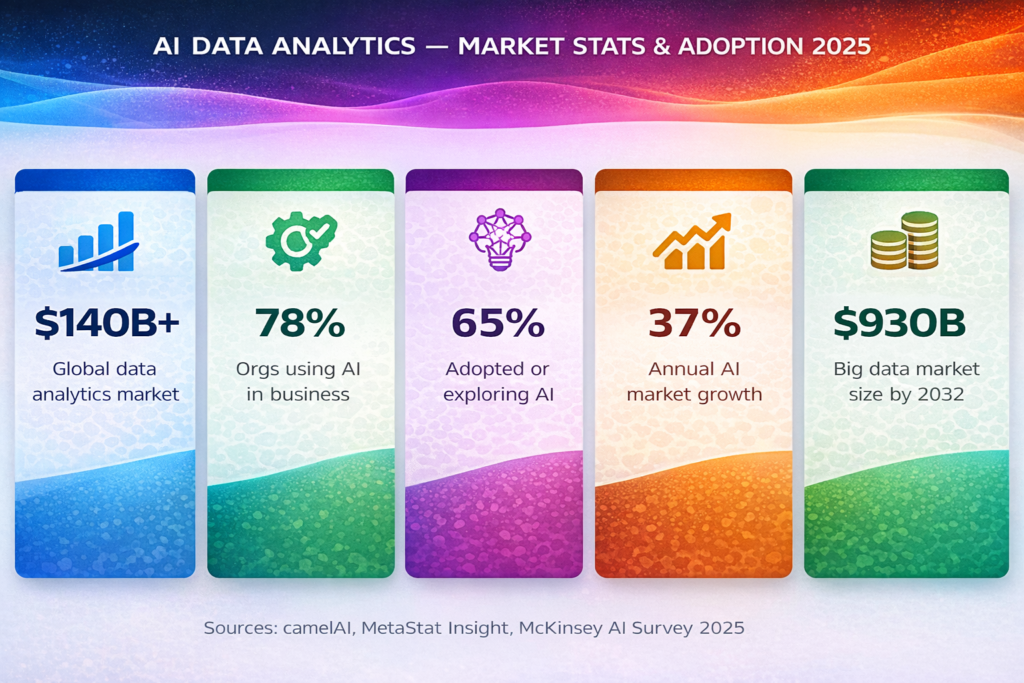
The landscape of data analytics tools and AI has undergone a profound transformation. What once required teams of data scientists with deep programming expertise can now be accomplished by business users asking questions in plain English. Artificial intelligence has fundamentally reshaped how organizations collect, process, visualize, and act on data, automating the most time-consuming parts of analysis and democratizing access to insights that were previously locked behind technical barriers. With the global data analytics market projected to exceed $140 billion in 2025 and 78% of organizations now using AI in at least one business function, choosing the right AI analytics tool has become one of the most consequential technology decisions a business can make.
This comprehensive guide covers the best AI data analytics tools available in 2026, from conversational platforms that let non-technical users query data with natural language to enterprise-grade machine learning environments used by the world’s largest organizations. For a broader context on how AI is transforming business technology, data analytics represents one of the most mature and impactful application areas the field has yet produced.
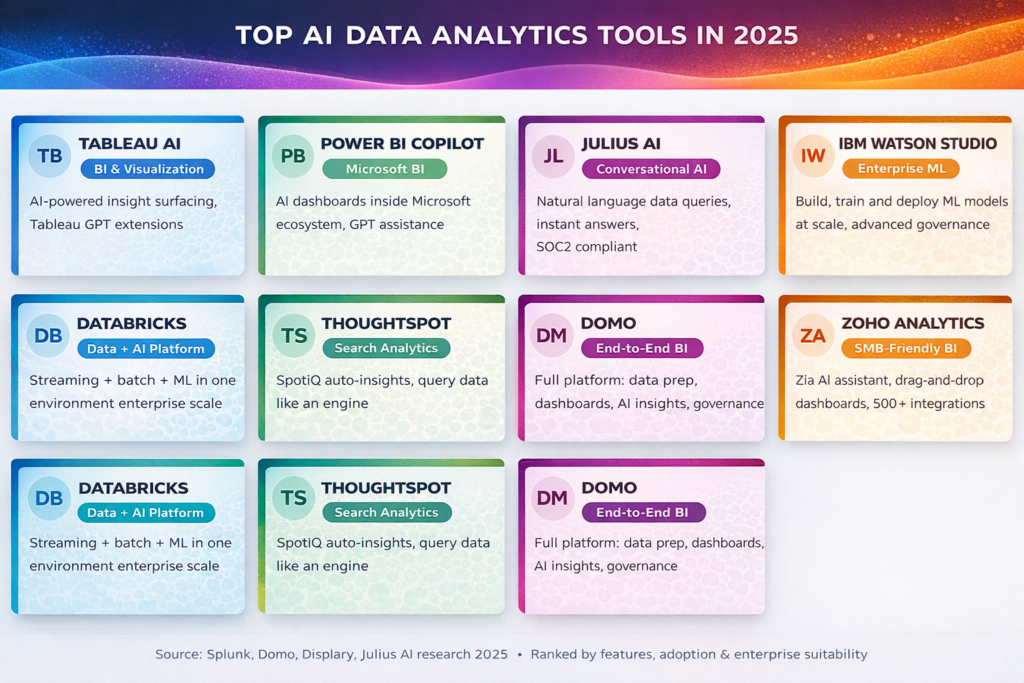
Top AI Data Analytics Tools in 2025
What Are Data Analytics Tools AI?
AI data analytics tools are software platforms that use artificial intelligence, machine learning, and natural language processing to automate and enhance the process of collecting, cleaning, analyzing, and visualizing data. Unlike traditional BI tools that require users to manually build dashboards or write SQL queries, AI-powered analytics platforms can identify patterns, surface anomalies, forecast trends, and answer questions about data in real time often with no coding required.
The newest generation of data analytics tools, AI, goes further still: users can simply type a question like ‘What were our five best-performing products last quarter?’ and receive an instant, accurate answer, complete with a chart, no dashboard building, no data team required. This shift from tool-centric to conversation-centric analytics is the defining characteristic of the 2025 landscape, and it is reshaping both how organizations hire for data roles and how they budget for technology infrastructure.
Market Context: The global big data analytics market is projected to reach approximately $930 billion by 2032, growing at a compound annual growth rate of 13.5% from 2025. Nearly 65% of organizations have already adopted or are actively investigating AI technologies for data and analytics as of 2025.
AI Data Analytics Market Stats & Adoption
The Best AI Data Analytics Tools in 2025
1. Tableau AI (with Tableau Pulse)
This remains one of the world’s most widely used data visualization platforms, and its AI integrations have dramatically extended its capabilities. Tableau AI now includes Tableau Pulse, and GPT-powered extensions can automatically generate. These insights, based on trends in datasets, suggest visualizations and surface anomalies without waiting for a user to ask. These pulses deliver personalized, AI-generated insight digests directly to business users, translating complex data patterns into plain-language summaries. For organizations already invested in the Salesforce ecosystem, Tableau AI represents the most natural path to AI-powered analytics.
2. Microsoft Power BI Copilot
Power BI Copilot is Microsoft’s AI-powered layer built directly into its market-leading business intelligence platform. Copilot can generate complete dashboards from natural language descriptions, write DAX formulas on command, summarize reports in plain language, and suggest follow-up analyses. For organizations already embedded in the Microsoft ecosystem using Azure, Teams, and Office 365, Power BI Copilot offers a near-seamless AI analytics experience with no additional infrastructure investment. The platform’s native integration with Azure Machine Learning also opens the door to more advanced predictive capabilities. As AI in business is reshaping workflows, Power BI Copilot is one of the clearest examples of AI making advanced analytics genuinely accessible to non-technical users.
3. Julius AI
Julius AI is one of the most compelling purpose-built AI analytics tools of 2025, designed specifically around the conversational analysis use case. Users upload spreadsheets, connect databases, or link to data sources, then ask questions in plain English and receive instant charts, statistical summaries, and written insights. Julius is SOC 2 Type II, TX-RAMP, and GDPR compliant, making it suitable for organizations handling sensitive data. Real-world case studies show that companies have reduced data analysis time from a full day to under an hour using Julius. Starting at $29.16 per month billed annually, it sits in an accessible price tier for teams that need AI tools without enterprise-scale budgets.
4. IBM Watson Studio
IBM Watson Studio is an enterprise-grade platform built for data scientists and machine learning engineers who need to build, train, and deploy custom models at scale. Unlike the more accessible conversational tools, Watson Studio is a serious ML development environment with capabilities spanning automated data preparation, predictive analytics, model governance, and deployment pipeline management. It supports use cases including fraud detection, demand forecasting, customer churn prediction, and advanced personalization. Watson Studio integrates with IBM’s broader cloud ecosystem and is most appropriate for large enterprises with dedicated data science teams who need deep customization and robust governance controls.
5. Databricks
Databricks is a unified data and AI platform that combines batch processing, real-time streaming analytics, and machine learning in a single environment. Built on Apache Spark and the Delta Lake open table format, Databricks excels at processing massive datasets with low-latency event processing making it the platform of choice for organizations that need to run machine learning models on live, streaming data. Its MLflow and AutoML capabilities support everything from quick model baselines to full production deployments. The platform requires meaningful engineering expertise to set up and manage, positioning it for large technical teams rather than business users. Pay-as-you-go pricing makes it scalable for variable workloads. Just as AI in manufacturing demands real-time insight at scale, Databricks is frequently the platform of choice for industrial and operational analytics.
6. ThoughtSpot
ThoughtSpot takes a search-first approach to business intelligence. Rather than building dashboards that users then navigate, ThoughtSpot lets users type or speak a question and receive AI-generated answers and visualizations without any dashboard-building step. Its SpotIQ engine automatically analyzes data to surface anomalies, trends, and patterns, proactively identifying what is interesting in the data without waiting for users to ask the right question. This makes ThoughtSpot particularly valuable for organizations where business users outnumber analysts and where fast, ad hoc insight is more important than deeply structured reporting.
7. Zoho Analytics
Zoho Analytics is a user-friendly business intelligence platform well-suited to small and mid-sized businesses that want AI-powered analytics without the complexity or cost of enterprise platforms. Its built-in AI assistant, Zia, handles conversational queries, generates automated insights, and performs anomaly detection across connected data sources. With drag-and-drop dashboard building, over 500 data source integrations, and affordable pricing tiers, Zoho Analytics makes AI analytics accessible to teams that may not have dedicated data resources. It is a practical starting point for organizations beginning their AI analytics journey.
8. KNIME: Best Free Open-Source Option
KNIME is the leading free, open-source option in the AI analytics space. It offers a visual, node-based interface for building data pipelines, applying machine learning algorithms, and creating automated workflows without writing code. While the learning curve is steeper than consumer-friendly tools, KNIME’s capabilities are genuinely powerful: it has a vast library of pre-built components, strong community support, and integrations with Python, R, and major cloud platforms. For organizations with budget constraints and technical capacity, KNIME represents extraordinary value. It connects naturally to broader machine learning workflows and is widely used in academic and research settings.
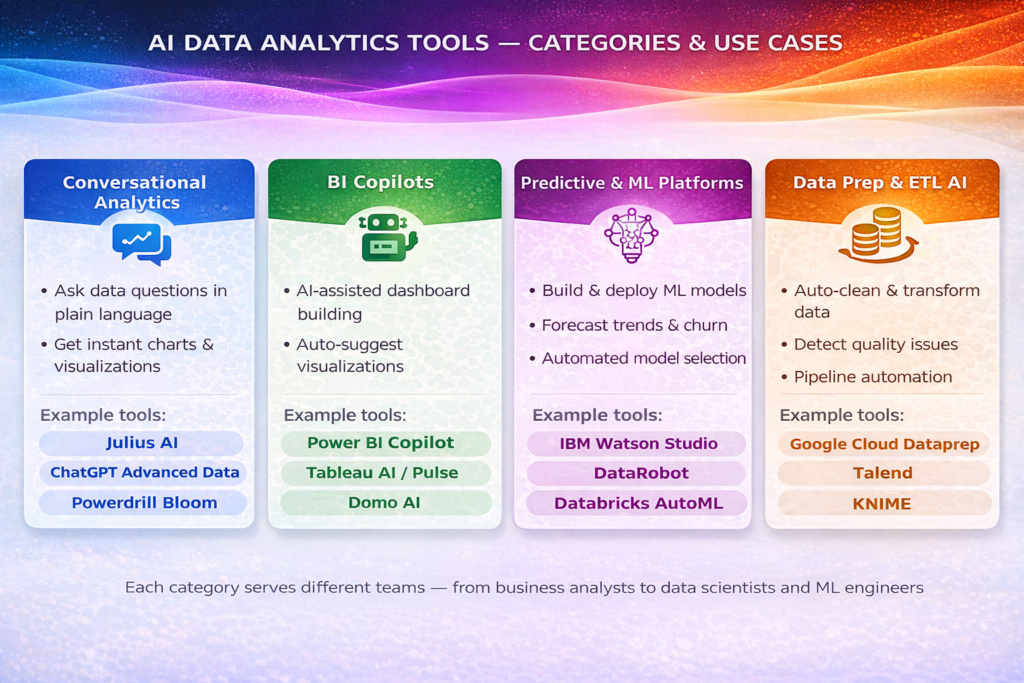
Tool Categories & Use-Case Matrix
Comparing the Top AI Data Analytics Tools
| Tool | Category | Best For | Free Tier | Starts At |
| Tableau AI | BI / Visualization | Enterprise data storytelling | No | $75/mo |
| Power BI Copilot | BI Copilot | Microsoft ecosystem | Yes | $0 (Desktop) |
| Julius AI | Conversational AI | Quick insights, SMB teams | No | $29/mo |
| IBM Watson Studio | Enterprise ML | Data science teams | No | Custom |
| Databricks | Data + AI Platform | Large-scale ML + streaming | No | Pay-as-you-go |
| ThoughtSpot | Search Analytics | Business user self-service | No | Custom |
| Zoho Analytics | SMB BI | Small teams, beginners | No | $30/mo |
| KNIME | Open-Source ML | Technical users, research | Yes | Free |
| Domo | End-to-End BI | Full-platform governance | No | Custom |
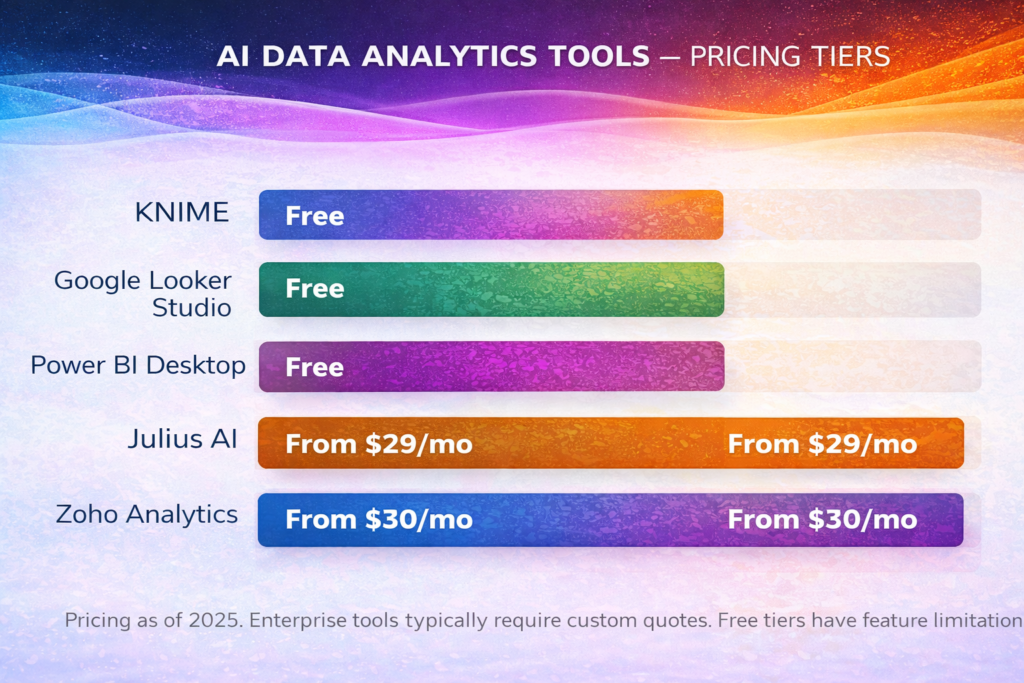
Pricing Tiers Across AI Data Analytics Tools
How AI Is Transforming Data Analytics
The integration of artificial intelligence into data analytics is not merely about making existing processes faster. It represents a categorical shift in what is possible and who can do it. The following are the most significant ways AI is reshaping the analytics landscape in 2025.
Automated Data Preparation
Data preparation, cleaning, transforming, merging, and formatting raw data into analysis-ready formats has historically consumed up to 80% of a data analyst’s time. AI-powered data prep tools now automate most of this work, detecting quality issues, recommending fixes, standardizing formats, and flagging anomalies automatically. Platforms like Google Cloud Dataprep, Talend, and KNIME have made AI-driven data cleaning a standard part of modern analytics workflows.
Natural Language Querying
The ability to query data in plain language is perhaps the most transformative feature of modern business intelligence tools. Rather than waiting for a data analyst to build a report or write a SQL query, business users can ask direct questions and receive immediate answers. This capability, delivered by tools like Julius AI, ThoughtSpot, and Power BI Copilot, is fundamentally democratizing access to data insights. It connects directly to the broader trend described in AI in education: when barriers to entry are reduced, more people can participate in data-driven decision-making.
Predictive and Prescriptive Analytics
Beyond describing what happened, AI analytics tools can now forecast what is likely to happen and recommend the best course of action. Predictive analytics uses historical patterns to model future outcomes, such as customer churn, product demand, financial risk, and market trends. Prescriptive analytics goes further, combining AI with optimization algorithms to recommend the action that maximizes a desired outcome. These capabilities, once available only to organizations with dedicated data science teams, are now accessible through platforms like IBM Watson Studio, DataRobot, and Akkio.
Anomaly Detection and Real-Time Monitoring
AI-powered anomaly detection allows organizations to catch problems the moment they emerge, such as a sudden drop in conversion rates, an unusual spike in transaction failures, or a deviation from expected inventory levels. Platforms like Splunk, Anodot, and Databricks use machine learning algorithms to establish baselines and flag deviations in real time, enabling faster response and reducing the cost of undetected issues. For industries like finance and healthcare, this capability is not a nice-to-have — it is a critical operational requirement. As explored in AI in healthcare, real-time anomaly detection is already saving lives by flagging unusual patterns in patient data.
How to Choose the Right AI Data Analytics Tool
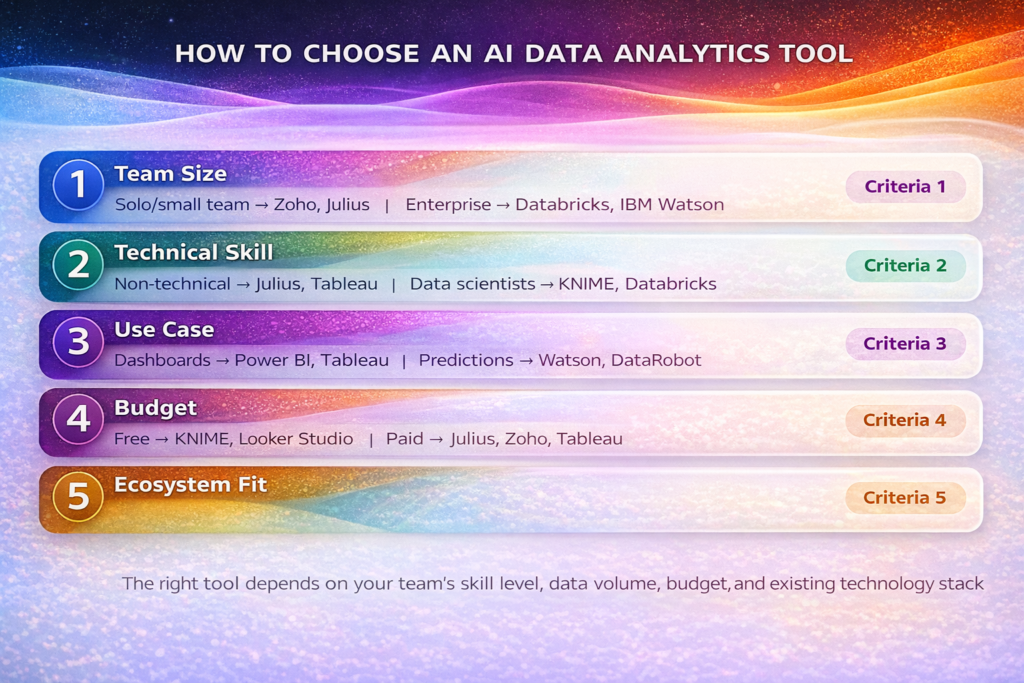
How to Choose the Right AI Data Analytics Tool
With so many capable platforms available, selecting the right AI data analytics tool requires an honest assessment of your organization’s specific needs, constraints, and ambitions. The following criteria provide a practical framework for making this decision.
Team size and structure:
Small teams benefit from accessible, self-service tools like Julius AI or Zoho Analytics. Enterprise organizations with dedicated data teams should evaluate IBM Watson Studio, Databricks, or Domo.
Technical skill level:
Non-technical business users need conversational tools with intuitive interfaces. Data scientists and ML engineers need environments that support custom model development, code integration, and deployment pipelines.
Primary use case:
Dashboard reporting and visualization
- → Tableau, Power BI, Conversational querying
- → Julius AI, ThoughtSpot. Predictive modeling
- → Watson Studio, DataRobot. Real-time streaming
- → Databricks, Splunk.
Budget:
Free and open-source tools (KNIME, Google Looker Studio, Power BI Desktop) are viable starting points. Mid-market tools range from $20–$80 per user per month. Enterprise platforms typically require custom pricing based on data volume and seats.
Existing technology ecosystem:
Organizations heavily invested in Microsoft products should start with Power BI Copilot. Google Cloud users benefit from Looker Studio and BigQuery ML. Salesforce customers have a natural path through Tableau AI.
Data governance and compliance requirements:
Regulated industries (finance, healthcare, government) must prioritize tools with robust security, audit trails, and compliance certifications. IBM Watson Studio and Databricks offer the strongest enterprise governance capabilities.
Conclusion
The best data analytics tools and AI platforms of 2025 share a common quality: they are making advanced, AI-powered insights accessible to more people than ever before. Whether through conversational interfaces that let business users query data in plain language, BI copilots that generate dashboards automatically, or enterprise ML platforms that power fraud detection and demand forecasting at scale, these tools are fundamentally changing how organizations use data. Choosing the right platform depends on your team’s size, technical capability, budget, and specific use case, but the overriding message is clear: the era when data analytics required specialist expertise is ending. With the right data analytics tools, AI insight is becoming a resource available to every decision-maker in every organization. For continued reading on how AI is reshaping every sector of business, AI Journal provides regularly updated expert analysis on the tools, trends, and strategies driving this transformation.
FAQs
What are AI data analytics tools?
AI data analytics tools use artificial intelligence and machine learning to automate data analysis, generate insights, and create visualizations with minimal manual effort.
Which is the best AI data analytics tool in 2025?
Top tools include Tableau AI, Power BI Copilot, and Julius AI, depending on your needs.
Can non-technical users use AI analytics tools?
Yes, many tools offer natural language querying, allowing users to analyze data without coding skills.
Are there free AI data analytics tools available?
Yes, platforms like KNIME offer powerful free options for data analysis.
What is the main benefit of AI in data analytics?
AI automates data preparation, detects patterns, and provides real-time insights, saving time and improving decision-making.
Which tool is best for small businesses?
Zoho Analytics is ideal for small teams due to its affordability and ease of use.
What is conversational analytics?
It allows users to ask questions in plain English and get instant insights, charts, or summaries from their data.
Which tool is best for enterprise-level analytics?
IBM Watson Studio and Databricks are best suited for large-scale enterprise needs.
Do AI analytics tools support real-time data processing?
Yes, platforms like Databricks support real-time and streaming data analytics for instant insights.
How do I choose the right AI analytics tool?
Consider your budget, team size, technical skills, and specific use case before selecting a tool
